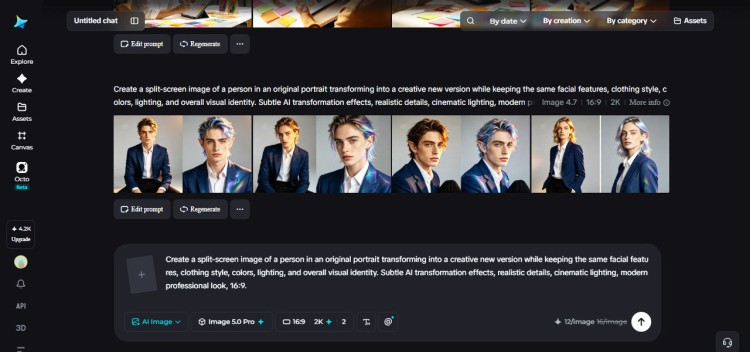

Dreamina’s Seedream 5.0 Pro brings a practical shift to image editing by letting creators transform existing photos while preserving their original style-mood, composition, color relationships and visual personality-rather than rebuilding images from scratch. The tool, built into Dreamina’s AI image generator, is designed for targeted changes: swap a dress, change a background or alter a single prominent element while keeping the photo’s cinematic lighting and texture intact.
The platform encourages users to begin by identifying what makes the original image recognizable-warm lighting, soft tones, editorial framing, dramatic shadows or tactile texture-and to treat those traits as the image’s identity. Editors are urged to separate identity elements (atmosphere, lighting language, composition, overall aesthetics) from variable elements (objects, wardrobe, specific colors) so instructions to the model are precise and controlled.
Adding a reference image gives Seedream a visual anchor and helps the model infer subtle relationships among color, composition and lighting. The source recommends choosing a reference with a clear theme and visual flow, and to tell the model exactly what should stay the same and what should change rather than issuing a vague “make this different” command. For example, the guidance includes the prompt: “A fashion designer in a stylish creative office in a neutral charcoal jacket, transforms the referenced fashion portrait shot in a refined creative studio into a contemporary fashion editorial image, preserving the warm cinematic lighting, soft shadows, neutral palette, elegant framing, realistic fabric texture, and sophisticated magazine photography style. Change the background to a modern design studio with subtle sketches and fabric samples.”
Seedream 5.0 Pro adds fine controls suited to style-preserving work: point and lasso selection, sketch guidance, regional controls and layer-aware separation for subject, background, text and effects. It offers native text generation in 14 languages, built-in online research to supply contextual visual concepts, and high-resolution output up to 2K for sharp textures and accurate lighting. Users can choose Image 5.0 Pro as the model, pick aspect ratio and output size (1K for experiments, 2K for detailed finals), then generate and iterate.
Practical editing tools include inpaint for precise adjustments, expand for extra canvas, remove for unwanted elements and retouch for finishing. The article stresses consistency for campaigns-keep anchors such as light direction, color relationships, camera perspective and texture so variations read as a single creative family. It also warns that sometimes original details-characteristic shadows, material texture or framing-should be preserved because removing them would harm believability.
Finally, Dreamina’s workflow pairs image-to-image editing with Seedance 2.5 for video preparation, letting creators produce consistent frames and assets for AI-generated video while maintaining the original image’s essence.
Original Source: https://www.sikkimexpress.com/news-details/how-to-transform-existing-images-without-losing-their-style
Category:
Tags:
Publish Date: